Don’t let bad audio quality ruin your livestream. Nobody wants to watch a pixelated mess with muffled audio. But not everyone is watchable and engaging. Some events I’ve heard…were downright awful. Here’s some links to audio equipment and tips I’ve learned from experience:
The unsung hero of any good stream: audio. Because let’s face it, you can have stunning visuals, but if your sound is garbage, people will click away faster than you can type the word “buffering.”
Audio Should Be the Priority
Let’s talk equipment. A lot of this stuff just used to be just a series of words to me–almost a foreign language–but once you use the items, you start to recognize them and they’re not so intimidating. Livestream audio quality is only as good as the equipment you use.
XLR Cable: This is your workhorse. Most professional microphones and recorders use XLR connections. These cables minimize noise and interference, ensuring your audience hears sound clearly. They have distinctive circular connectors with three pins inside (male) or three holes (female). This is the most visually recognizable feature.
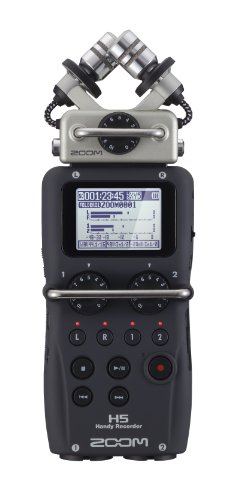
Run it from a mult or press box (if you have one) to a Zoom H5 recorder.
Ok. What the hell is a press box? Okay, imagine you’re at a press conference. There’s a speaker at the podium, and a bunch of reporters with microphones, cameras, and recorders are trying to capture the sound. If everyone plugged their equipment directly into the speaker’s microphone, it would be a tangled mess, and the sound quality would likely be terrible. That’s where a mult box, also known as a press box, comes in.
Think of a mult box as a central hub for audio. It takes the audio signal from one source—like the speaker’s microphone—and splits it, or “multiplies” it, so that many different devices can receive the same clean audio signal at the same time.
What’s a Zoom H5 Recorder? This little guy is a portable recorder that captures high-quality audio, acting as your backup.
Here’s how it works:
- One Input: The main audio source (like a microphone or a soundboard) plugs into the mult box’s input.
- Multiple Outputs: The mult box has many output connections, usually XLR ports (those three-pin circular connectors we talked about earlier).
- Clean Signal Distribution: The mult box takes the single audio input and splits it, sending an identical copy of the signal to each of the output ports. This means each reporter or recorder can plug into the mult box and receive a high-quality version of the audio without interfering with each other.
Now, pro tip: Lower the output level on the Zoom H5. This is crucial to avoid distortion and keep your audio crisp.
iPhone Connection: Grab a stereo mini plug and connect the line out from your Zoom H5 to your iPhone. A stereo mini plug is the small, round plug commonly used for headphones, earbuds, and other audio devices. It’s the kind of plug you typically find on the end of headphone cables.
It’s used to connect the line output of your Zoom H5 recorder to the input of your iPhone. This allows the audio captured by the Zoom H5 to be sent to the iPhone for recording or streaming.
And don’t forget to plug your headphones into the Zoom H5 so you can actually hear what’s going out to your audience.
**You may need an adapter like this dongle to plug audio into the USB-C connector.
Other useful livestream audio equipment:
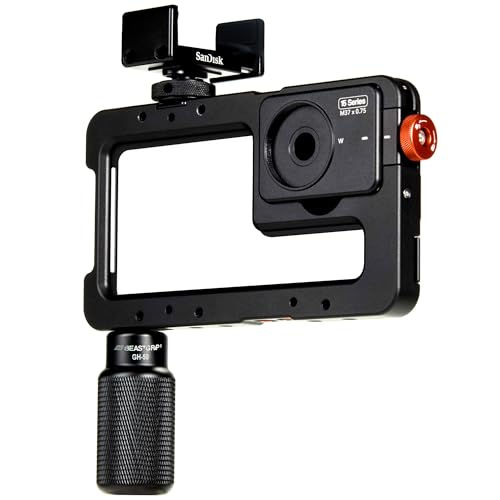
- BeastGrip Pro for iphone 15 (a holder that securely clamps onto most smartphones, allowing you to attach various accessories and improve your phone’s camera capabilities.)
- iOgrapher telephoto zoom lens
- USB-C Wireless mic
- Lavalier microphone that comes with a receiver
- All-in-one Zoom H5 Handy Recorder Kit
- Sennheiser in-ear wired audio monitor headphones

Pro Tips:
Hard-Wired is Your Best Friend: For important events like news conferences, ditch the wireless stuff and go hard-wired. Phone microphones are convenient, but room sound can be unpredictable. A wired connection ensures a stable and reliable audio feed.
Repeat After Me: When you’re answering questions, repeat the question for your viewers. This is super important for context, especially for those who might have missed the initial question first time around.
Sign Language Matters: For large events, if you can, include an American Sign Language (ASL) interpreter. Accessibility is key, and it shows that you care about making your content available to everyone.

Some of the links in this post are affiliate links. That means if you click through and make a purchase I may make a small commission at no cost to you.